Hajra Naz

Instagram Threads, Meta’s fast-growing rival to X (formerly Twitter), now has over 400 million monthly active users. And Meta just announced a new feature that could change how people use the app: Communities.
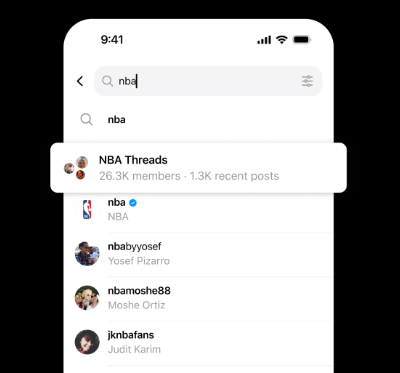
On Thursday, Meta revealed that it’s rolling out 100+ communities where users can have casual conversations around topics like basketball, K-pop, TV shows, books, and more.

What Are Threads Communities?
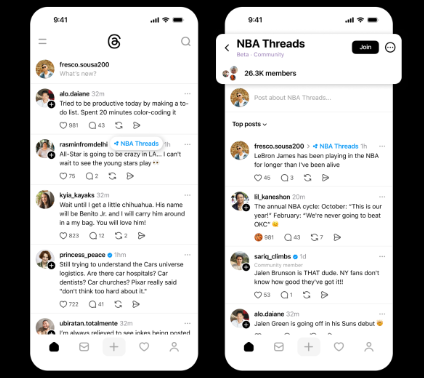
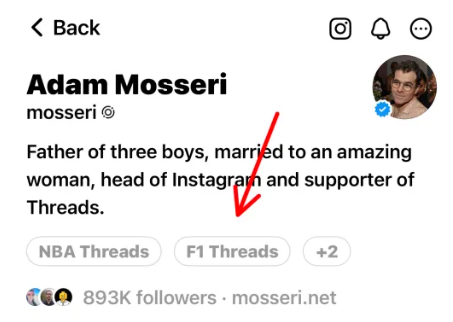
Meta says the goal of communities is to give users dedicated spaces to talk about things that matter to them. When you join one, the community will show up on your Threads profile. Each community also comes with a special “Like” emoji just for its members.
For example:
-
In the NBA Threads community, the “Like” emoji is a basketball.
-
In the Books Threads community, it’s a stack of books.
Active members may also get a profile badge in the future.
Read More: Meta Unveils New Advertising Features for Reels and Threads
How Threads Communities Differ From X Communities
At first glance, Threads’ version looks similar to X’s Communities feature, but there are key differences:
-
Who creates them:
-
On X, communities are created and moderated by users.
-
On Threads, only Meta creates communities; users cannot make their own.
-
-
Who can participate:
-
On X, only community members can post.
-
On Threads, non-members can also join discussions, but members get special privileges (like custom emojis).
-
-
Visibility:
-
On both apps, posts from communities can still appear in the For You and Following feeds, so they’re not fully private.
-
How Communities Show Up on Profiles
Joining a Threads community is public. Others will see your membership on the community’s page, and the community’s topic tag will be added to your profile.
Unlike on X, you can’t hide this. Meta says it’s designed so people can instantly see what you’re interested in.
Read More: Threads Rolls Out Auto-Added Thread Counts on Posts
Why This Fits: How Threads Is Already Used
Communities on Threads feel natural because users were already building them informally:
-
People started organizing around Topic Tags (like NBA Threads) right after launch.
-
Some of those tags became mini-communities long before this feature was official.
-
Now, users don’t need to remember to add a tag — they can just post straight to the community.
-
You can also reorder your feeds so your favorite community’s posts appear first.
This is similar to how early Twitter (now X) adopted user-created trends, like hashtags and retweets, and turned them into official features. Threads is following the same playbook.
What’s Next for Communities?
Meta says it’s testing communities around the most active interests right now, with plans to add more over time.
It will also test new ranking systems that push the best community posts to the top, both inside the community feed and the wider For You feed.
Adam Mosseri, Instagram’s head, has already teased the feature, and early testers have been trying it before the wider launch.
With Threads already catching up to X in daily active users on mobile, communities may help the app grow even faster.
Read More: Meta’s Threads Reaches 400 Million Users, Rivals X’s Reach
FAQs About Threads Communities
Q1: Can I create my own Threads community?
No. Only Meta creates communities. Users can’t make their own yet.
Q2: Are Threads communities private?
Not really. Posts can still show up in For You and Following feeds, even for non-members.
Q3: Can I hide the communities I’ve joined from my profile?
No. Communities are public, and their topic tags are automatically displayed on your profile.
Q4: Do all communities have custom emojis?
Yes. Each community gets its own “Like” emoji, such as a basketball in NBA Threads or books in Book Threads.
Q5: Will more communities be added later?
Yes. Meta says it’s starting with over 100 communities around popular topics, but plans to expand in the future.