Hassan Khan
Anyone who has dealt with slow internet knows the drill you quickly open a browser, type “speed test,” and wait for a site like Ookla or Fast.com to load. It’s an extra step that feels small but becomes annoying when you’re already frustrated with lag. Microsoft seems to have picked up on this, and now Windows 11 is quietly adding a shortcut to make life a bit easier.
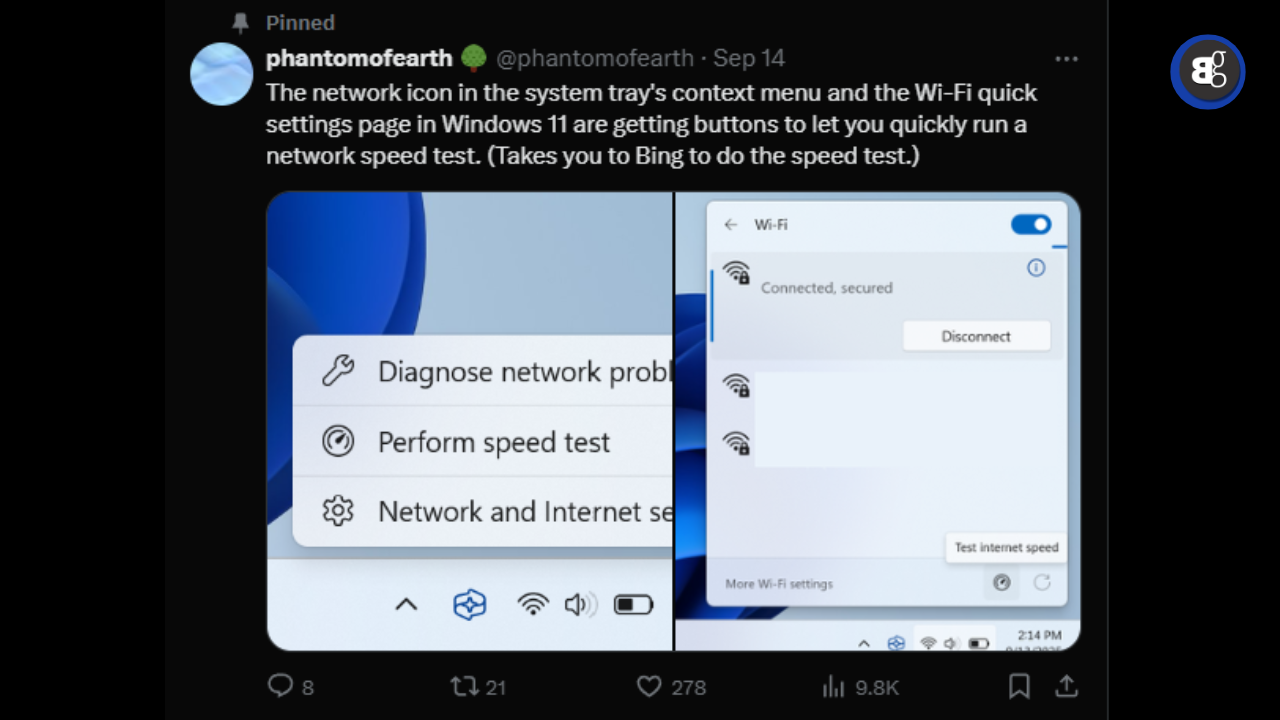
In the latest Insider builds, a new button is showing up in two familiar places: when you right click the network icon in the taskbar, and inside the Wi-Fi quick settings panel. One tap and you’re taken straight to Bing, where the speed test runs. To be clear, it’s not a full “built into Windows” solution yet it still depends on Bing but at least you won’t need to search or open another site.

This update is part of a batch of smaller tweaks Microsoft is rolling out. Bluetooth settings are being reorganized so linked phones appear in one central spot, instead of being hidden across different menus. Privacy and Security pages are also being refreshed with clearer labels, which should help everyday users who don’t want to dig through complicated technical text.
Another new page called “Background AI tasks” has appeared too, though at the moment it seems buggy and crashes for some testers. Still, its presence shows how much Microsoft is leaning toward AI integration inside Windows going forward.
All of these changes are currently limited to Insider builds (26220.6682 and 26120.6682). That means casual users won’t see them right away, and some features may not even make it to the final public version. But judging by how small and practical they are, chances are good we’ll see them land in a stable update fairly soon.
For now, if you’re not in the Insider program, the best move is patience. Testing builds often come with glitches, and it’s usually smarter to wait until Microsoft pushes the features officially.