

 Hajra Naz
AI is changing how businesses create video content. From short social media clips to product advertisements, companies now have more ways to produce videos with artificial intelligence. This shift has also created new opportunities for freelancers who know how to combine AI tools with professional editing skills.
The demand is visible on freelance platforms. According to Upwork’s September 2026 Monthly Hiring Insights report, AI video was the most-searched AI-related term in its marketplace. AI video creator, AI video generator, and AI video editor also appeared among the top 10 AI-related searches.


For freelancers, this points to a growing market for creative video services. However, knowing how to generate a clip is only one part of the job. Clients also need people who can edit footage, add voiceovers, create advertisements, maintain brand consistency, and deliver videos that serve a specific purpose.
If you want to find AI video editing jobs in 2026, you need more than access to a few AI tools. You need practical editing skills, a portfolio that shows your work, and the ability to understand what clients want.
Why Are AI Video Editing Jobs Growing in 2026?
Businesses need video content across websites, social media platforms, online stores, and advertising campaigns. Producing every video through traditional filming can require cameras, equipment, actors, locations, and a production team. AI tools offer another way to create visual content with fewer production resources.
This change has increased interest in freelancers who understand AI-assisted video production.
Upwork’s 2026 In-Demand Skills report found that demand for AI video generation and editing grew by 329% year over year on its marketplace. The September 2026 hiring report added another important signal. AI video became the most-searched AI-related term that month, ahead of AI automation.
Four video-related terms also appeared among the top 10 AI searches:
- AI video
- AI video creator
- AI video generator
- AI video editor
These findings suggest that businesses are looking for different types of video production support. Some clients need AI-generated footage. Others need complete advertisements, edited social media videos, or creative content for marketing campaigns.
This creates opportunities for freelancers with different skill levels and specializations.
Read More: AI Video Editing Services: The Fastest-Growing Freelance Skill of 2026
What Does an AI Video Editor Do?
An AI video editor uses artificial intelligence to assist with video creation and editing. The work can include generating scenes, editing footage, adding subtitles, creating voiceovers, and preparing videos for publication.
For example, an online store may need product videos for social media. A marketing agency may request several advertisements for a campaign. A business owner may need an animated explainer video for a website.
An AI video editor may handle tasks such as:
- Generating video clips from text prompts or images.
- Editing footage into complete videos.
- Adding captions, music, and voiceovers.
- Creating transitions and visual effects.
- Adjusting video sizes for different platforms.
- Maintaining brand colors and visual consistency.
AI tools can assist with production, but editors still need creative judgment to deliver professional results.
8 Essential Skills Freelancers Need for AI Video Editing Jobs
Learning the right skills can help freelancers offer services that clients need. Here are eight areas worth focusing on in 2026.
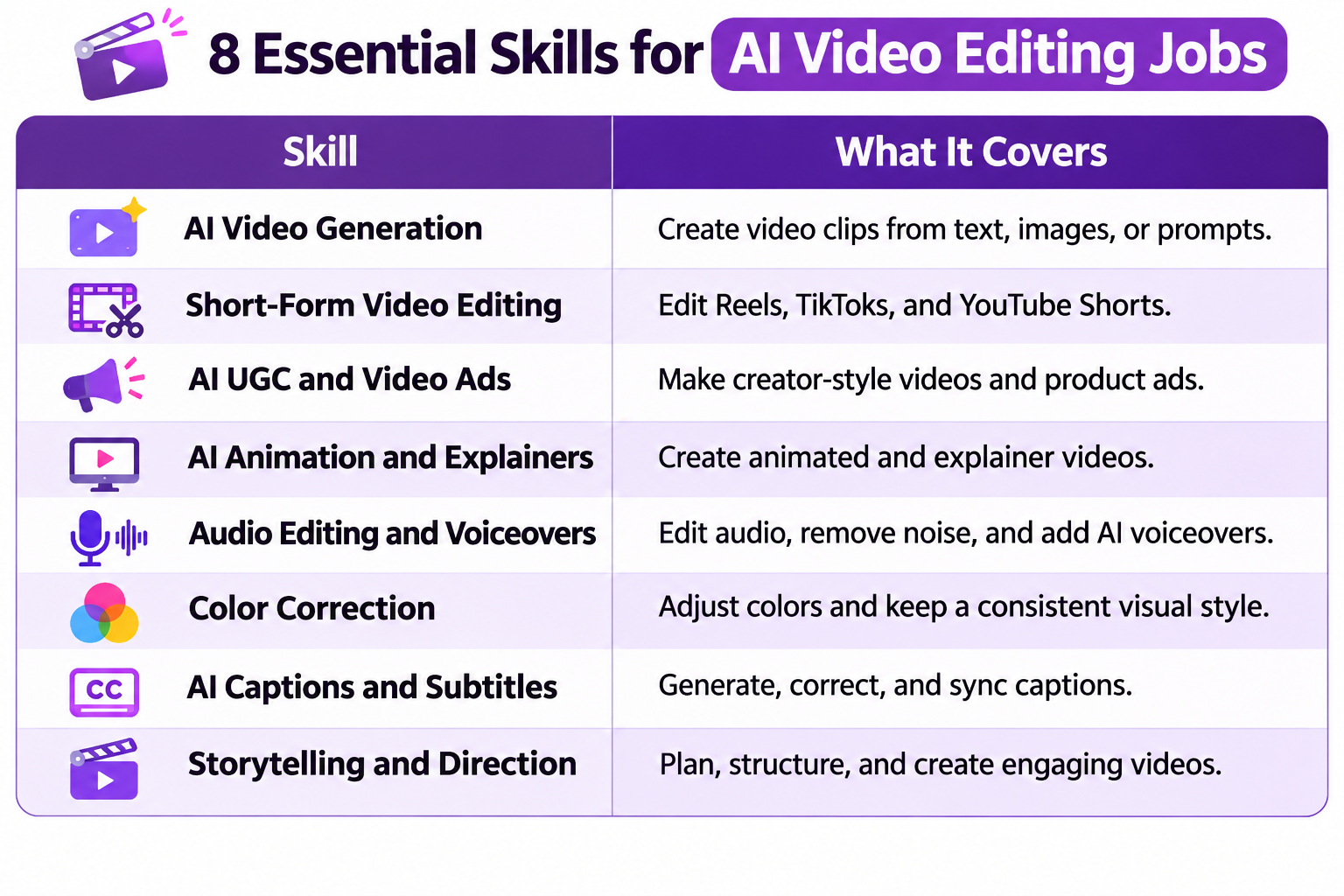
1. AI Video Generation
AI video generation allows creators to produce clips from text prompts, images, and visual references. Tools such as Runway can help freelancers create product visuals, promotional scenes, and creative footage.
However, good results require more than writing prompts. You should understand lighting, camera angles, scene composition, and visual continuity.
2. Short-Form Video Editing
Short-form content remains an important part of digital marketing. Businesses use Instagram Reels, TikTok, and YouTube Shorts to reach audiences with quick videos.
Freelancers should know how to edit vertical videos that hold attention and communicate a message without unnecessary footage.
Important skills include:
- Cutting unnecessary scenes.
- Adding readable captions.
- Creating strong opening hooks.
- Matching music with video transitions.
- Maintaining a suitable pace.
- Exporting videos in the correct format.
A client may provide a long interview and ask for five short clips. You must identify useful moments, remove pauses, add subtitles, and prepare each clip for social media.
This type of freelance video editing service can also lead to recurring work when clients need fresh content every week.
3. AI UGC and Video Ad Creation
User-generated content (UGC) has become a common format in online advertising. Brands often use creator-style videos to introduce products, explain features, and share product experiences.
AI tools can help produce presenter-style content, virtual avatars, and product demonstrations.
Freelancers who learn AI UGC production can offer services such as:
- Product demonstration videos.
- AI avatar advertisements.
- Short promotional clips.
- Social media ad variations.
- Product introduction videos.
For instance, an e-commerce brand may need several video ads for a new product. A freelancer can
- Prepare different scripts
- Create presenter-style footage
- Edit the clips
- Add brand elements.
The important skill is understanding the advertising message. A video should explain why the product matters rather than simply display attractive visuals.
4. AI Animation and Explainer Videos
Businesses often need videos that explain products, services, or complex ideas. Animation can make these topics easier to understand.
Freelancers can use AI-assisted production tools alongside traditional animation and editing software to create:
- Educational videos.
- Animated product explainers.
- Business presentations.
- Training videos.
- Motion-based social media content.
You should understand basic storyboarding, scene order, transitions, and visual communication.
A good explainer video follows a logical structure. It introduces a problem, explains the solution, and gives viewers a reason to take action.
5. Audio Editing and AI Voiceovers
Poor audio can affect the quality of an otherwise well-edited video. Freelancers should know how to work with narration, background music, sound effects, and voiceovers.
AI voice generation tools such as ElevenLabs can help create narration for promotional and educational videos.
You should also learn how to:
- Remove unwanted background noise.
- Adjust voice volume.
- Synchronize narration with visuals.
- Add suitable background music.
- Balance music and spoken audio.
- Check pronunciation and timing.
Some clients may provide their own voice recordings. Others may request AI-generated narration. In both cases, the final audio should sound natural and fit the video’s purpose.
6. Color Correction and Visual Consistency
AI-generated clips do not always match each other. One scene may have different lighting, colors, or visual details from another.
Freelancers need basic color correction skills to make the final video look consistent.
This includes adjusting brightness, contrast, saturation, white balance, and skin tones. You should also check whether the lighting and visual style remain consistent throughout the video.
Brand consistency matters too. If a company uses specific colors, fonts, and visual elements, your video should follow those guidelines.
7. AI Captions and Subtitles
Captions help viewers follow videos, especially when they watch without sound. They also make spoken content easier to follow.
AI tools can generate subtitles from audio, but automatic results may contain spelling errors, incorrect names, or timing problems.
Freelancers should know how to review and correct these captions.
Useful tasks include:
- Generating subtitles from speech.
- Correcting transcription mistakes.
- Synchronizing text with dialogue.
- Creating readable caption styles.
- Preparing subtitles in different languages.
This service can fit naturally into social media editing, YouTube production, and business video projects.
8. Storytelling and Creative Direction
Technical skills help you operate editing software. Storytelling helps you create videos that communicate something meaningful.
Clients may provide raw footage, a short script, or only a basic idea. You need to turn that material into a video with a logical beginning, middle, and ending.
This requires an understanding of:
- Audience expectations.
- Scene selection.
- Video structure.
- Visual storytelling.
- Brand messaging.
- Creative problem-solving.
Human judgment remains important throughout this process. AI can suggest scenes or generate footage, but a freelancer must decide whether the content fits the client’s message.
Read More: Why Brand Storytelling Should Be Your New Social Media Strategy
Best AI Video Tools Freelancers Should Learn in 2026
You do not need to learn every available tool. Start with a few that match your preferred services, then add other software as your projects require it.
Here are six useful options:
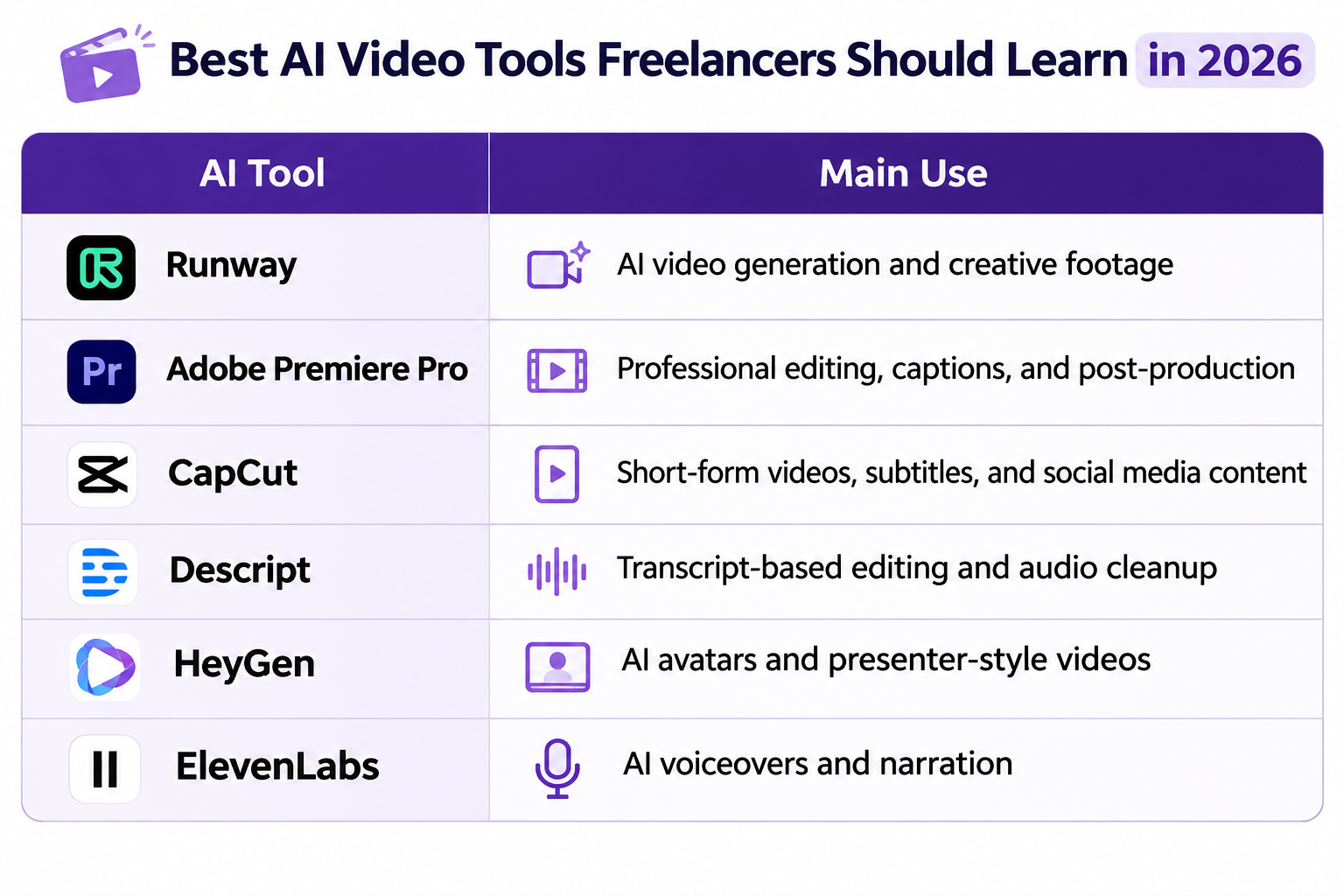 Each tool serves a different purpose. For example, CapCut and Premiere Pro can support social media editing, while HeyGen is useful for presenter-style videos. Runway can assist with AI-generated footage.
Choose tools based on the projects you want to offer rather than trying to learn everything at once.
Types of Freelance AI Video Editing Jobs Available
Once you develop your skills, you can offer different video production services. The right projects will depend on your experience, portfolio, and target clients.
Here are some services worth considering:
- Social Media Video Editing: Create Reels, TikToks, and YouTube Shorts from raw footage or AI-generated clips.
- AI Video Advertisements: Produce short promotional videos for e-commerce stores, service businesses, and marketing agencies.
- AI UGC Production: Create presenter-style videos, product demonstrations, and creator-inspired advertisements.
- YouTube Video Editing: Edit long-form videos, add captions, improve audio, and create supporting visuals.
- Corporate and Explainer Videos: Prepare company introductions, educational videos, and service explanations.
- AI Product Videos: Create product-focused visuals for online stores and advertising campaigns.
- Animated Video Content: Produce simple animated explainers, educational clips, and promotional sequences.
How to Get AI Video Editing Clients as a Freelancer
Learning video editing skills is only one part of building a freelance career. You also need to show potential clients what you can do and explain how your services can help their projects.
Here are five practical steps to start.
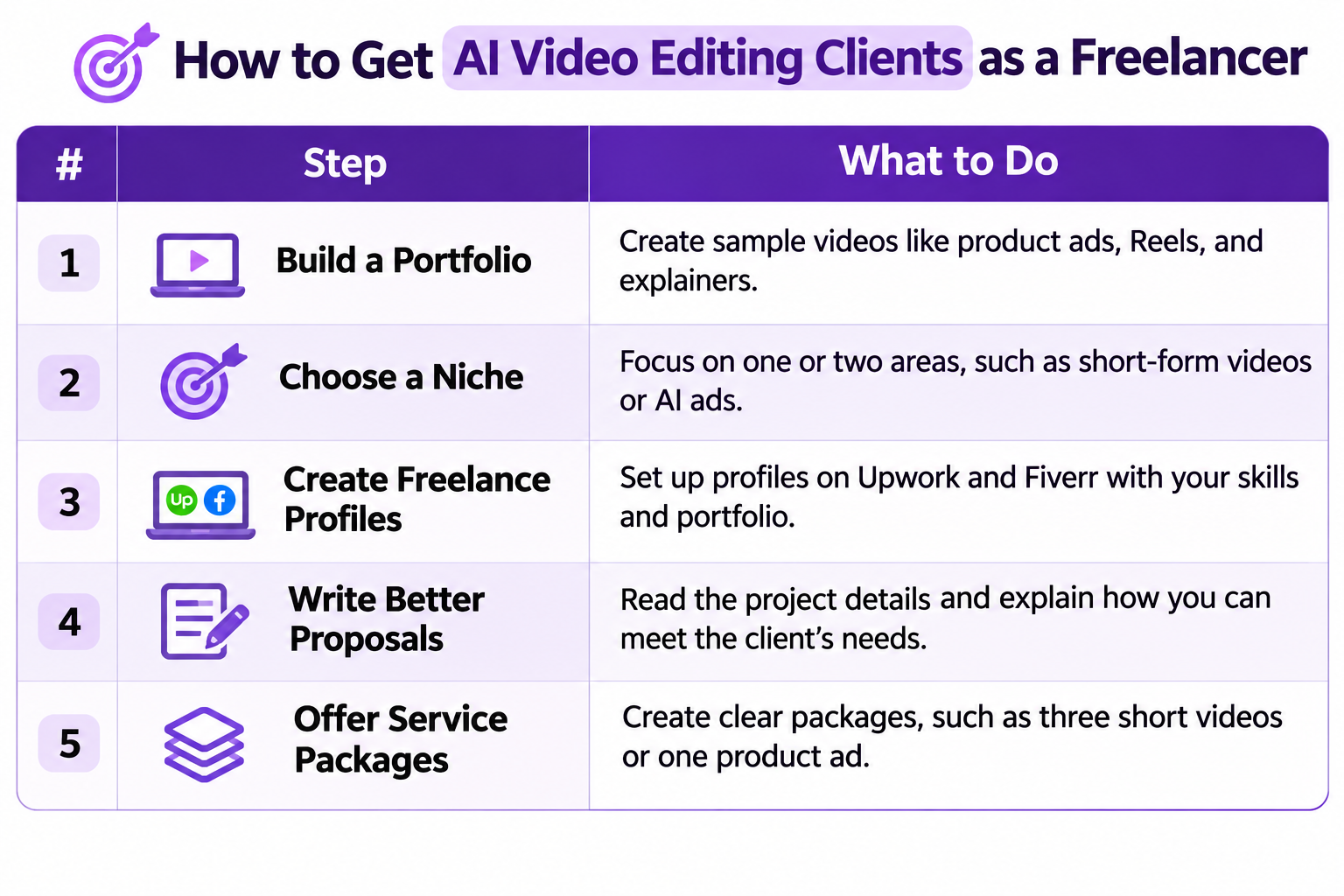
1. Build a Portfolio With Sample Projects
You do not need paid clients to create your first portfolio. Make sample videos that demonstrate different services.
For example, create:
- A short product advertisement.
- An Instagram Reel.
- An AI avatar presentation.
- A product demonstration.
- An animated explainer.
Use your own ideas or properly licensed materials. Clearly label personal practice projects as samples rather than client work.
Read More: How to create an impressive freelance portfolio
2. Choose a Specific Video Editing Niche
Offering every type of video editing service can make your profile difficult to understand.
Start with one or two areas where you can deliver good results. You might focus on short-form social media videos, AI product advertisements, or AI explainer videos.
A specific service also helps potential clients understand what they can hire you to do.
3. Create Profiles on Freelance Platforms
Platforms such as Upwork and Fiverr allow freelancers to connect with businesses that need creative services.
Your profile should include:
- A specific service description.
- Relevant editing skills.
- Portfolio samples.
- Software you know.
- Types of projects you accept.
Use terms such as AI video editor, AI video creator, and freelance video editing where they accurately describe your services.
4. Write Proposals That Address Client Needs
Avoid sending the same proposal to every client. Read the project description and identify the client’s main requirements.
Explain which parts of the project you can handle, what your editing process looks like, and which relevant sample you can share.
For example, if a client needs product advertisements, mention your experience with product visuals, captions, voiceovers, and short-form editing.
Read More: Writing Winning Freelance Proposals | 10 Cookie Cutter Freelance Proposals That Are Hard To Refuse
5. Offer Clearly Defined Services
Clients often prefer to know what they will receive before starting a project.
You can create packages based on deliverables, such as:
- Three short-form videos.
- One edited product advertisement.
- Five AI-generated social media clips.
- A complete explainer video.
State what each package includes. Mention the video length, revisions, captions, voiceovers, and delivery format.
This approach helps prevent confusion and gives clients a better idea of your service.
How to Build an AI Video Editing Portfolio Without Clients
A strong portfolio can help beginners compete for their first projects. It gives clients something concrete to review instead of relying only on claims about editing skills.
Start with three to five sample videos in your chosen niche.
For example, a beginner who wants to work with e-commerce brands can create a product advertisement, a short demonstration, and a social media promotional video.
Try to include different editing styles. Show your ability to work with AI-generated footage, traditional video clips, voiceovers, and captions.
You can also include a short explanation with each sample. Mention the project’s purpose, the tools you used, and the work you completed.
Keep the portfolio organized. A client should be able to find relevant examples without searching through dozens of unrelated videos.
Is AI Video Editing a Good Freelance Career in 2026?
AI video editing offers promising opportunities, but success depends on your skills, portfolio, and ability to meet client expectations.
Upwork’s 2026 research points to growing interest in AI video generation and editing. However, access to AI tools alone does not give freelancers a strong competitive advantage.
You must also understand storytelling, audio quality, visual consistency, and professional editing. Beginners can start with smaller projects and build experience through sample work. Experienced editors can add AI-assisted production to their existing services.
The strongest approach is to combine AI knowledge with creative skills. Clients need videos that represent their brands, communicate their messages, and meet their production goals.
Read More: The 7 Best Freelance Careers for Digital Nomads
Final Thoughts
AI video production is creating new opportunities for freelancers who know how to turn ideas into finished content. Upwork’s hiring data offers a useful signal of growing interest in these services.
However, learning a few AI tools is not enough. You also need editing knowledge, creative thinking, and an understanding of client requirements.
Start with one service, build a portfolio, and approach potential clients with relevant examples of your work. Combining AI tools with professional editing skills can help you compete for AI video editing jobs in 2026.
FAQs About AI Video Editing Jobs
1. What skills do you need to become an AI video editor?
Learn AI video generation, video editing, audio editing, captions, color correction, and storytelling.
2. Can beginners get AI video editing jobs?
Yes. Beginners can start with short-form videos, product clips, and basic advertisements. A portfolio helps attract clients.
3. Which AI video tools should freelancers learn?
Runway, Adobe Premiere Pro, CapCut, Descript, HeyGen, and ElevenLabs are useful options.
4. Where can freelancers find AI video editing clients?
Freelancers can find projects on Upwork and Fiverr or approach businesses, marketing agencies, and content creators directly.
5. Can you earn money as an AI video editor?
Yes. You can earn through product videos, social media editing, AI advertisements, and explainer videos. Earnings depend on your skills and clients.
6. Is AI video editing replacing traditional video editors?
No. AI assists with video production, but storytelling, creative direction, editing decisions, and quality control still require human skills.